

eSIM for International Students in Australia: First 2 Weeks
2026-09-11
You booked the flight, paid the tuition, and packed the adapter. The part people forget is the hour after you land — when you need to message home, find the airport train, and check the address of a share house you have never seen.
An eSIM handles that hour. It will not handle everything after it, and the gap catches most students out in week two.
What an arrival eSIM does, and what it doesn't
A travel eSIM for Australia gives you data. Maps, WhatsApp, email, ride share, translation — all of it works the moment you land, because you install the plan before you fly and it connects to an Australian network on arrival.
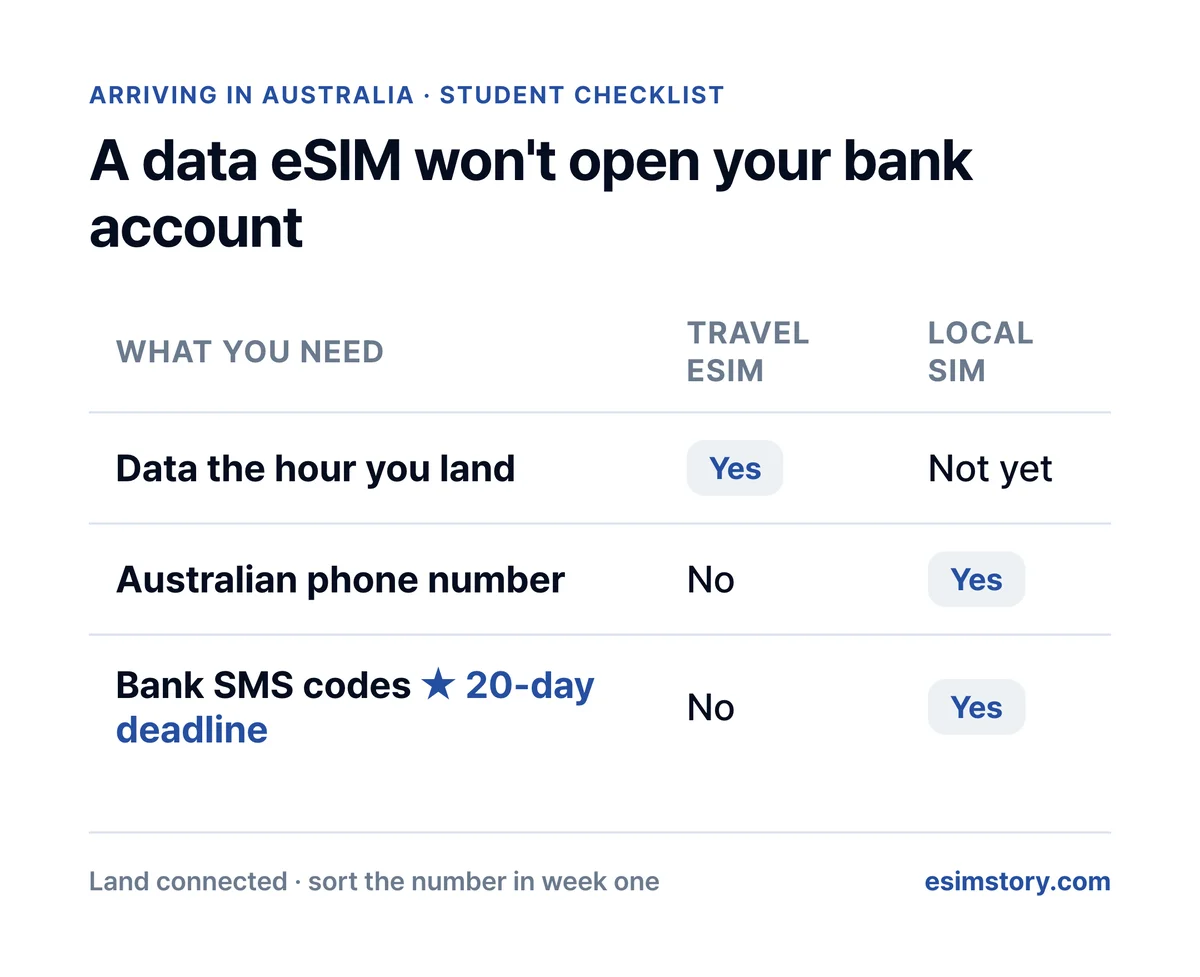
What it does not give you is an Australian phone number.
That sounds like a detail until you try to open a bank account. Australian banks use SMS two-factor authentication for almost everything: setting up the banking app, adding your card to Apple Pay or Google Pay, and moving money. Those codes go to an Australian mobile number. A data eSIM cannot receive them.
The deadline is real. CommBank lets you apply online up to 14 days before you arrive, then asks you to verify your identity at a branch within 20 days of landing — and the branch asks for your Australian mobile number.
So the plan is not "eSIM or local SIM". It is both, in order:
| What | Covers | When |
|---|---|---|
| Travel eSIM | Data from the moment you land | Buy before you fly |
| Australian SIM with a number | Bank 2FA, myGov, leases, job applications | Within your first few weeks |
The eSIM buys you the time to sort the second one properly, instead of signing whatever plan the airport kiosk is selling at 6am.
Arriving on a working holiday visa rather than a student one? The timing is the same — see the working holiday Australia eSIM guide.
How much data you actually need (less than you think)
Most sizing advice assumes you are on mobile data all day. Students are not.
Forty Australian universities run eduroam, the free campus wi-fi that works with your student login. Coverage is thorough — at many campuses it reaches 99% of buildings, outdoor areas and student accommodation. Once your enrolment is active, your weekdays are largely on wi-fi.
That changes the tier you should buy:
- 500 MB / day — enough if you are on campus most weekdays and using data for maps, messaging and music between classes.
- 1 GB / day — house hunting, lots of ride share, video calls home in the evenings before your home wi-fi is connected.
- 2–3 GB / day — you are streaming or tethering a laptop off campus.
Your heaviest data weeks are the first two, before eduroam and home internet are both working. Size for those weeks, not for the semester.
Your first few weeks, in order
- Before you fly — check your phone supports eSIM, then buy and install the eSIM. Do not activate it yet.
- On landing — activate. The validity period starts when you activate, so activating early at home wastes days.
- Day 1–3 — you are online. Get to your accommodation and settle in. Keep the eSIM running while you do; sorting a local plan takes an address, ID and a trip to a store, and that rarely happens in your first few days.
- Week 1–3 — get an Australian SIM with a number, then the bank branch visit. CommBank wants you there within 20 days of landing, and the branch asks for that number.
- After enrolment — connect to eduroam on campus and watch your mobile data use drop.
Keep your home number while you're here
Most current phones run a physical SIM and an eSIM at the same time. Leave your home SIM in the tray to receive codes from your bank back home, and let the Australian eSIM carry the data. You will need those home codes more than you expect during the first month.
Australia plans
Australia eSIM plans are data-only on the Optus network. Prices are the total for the plan, in USD, and you choose any length from 1 to 30 days.
| Daily data | 7 days | 14 days | 30 days |
|---|---|---|---|
| 500 MB / day | 6.37 USD | 11.93 USD | 22.56 USD |
| 1 GB / day | 10.15 USD | 18.70 USD | 35.58 USD |
| 2 GB / day | 15.20 USD | 24.93 USD | 42.03 USD |
| 3 GB / day | 21.22 USD | 31.15 USD | 53.10 USD |
Thirty days is the longest single plan, not a cap on how long you can use one. If you want longer, buy another plan when the first one runs out. Most students land on 7 or 14 days, then extend if the local plan takes longer than expected.
Questions students ask
Can I open an Australian bank account with just a travel eSIM?
You can start the application, but not finish it. The bank needs an Australian mobile number for SMS verification, and a data-only eSIM does not have one.
Should I activate the eSIM before I fly?
No. Install before you fly, activate after you land. Validity counts from activation.
Do I need mobile data if my university has eduroam?
Yes, for everything off campus — the airport, the train, house inspections, the supermarket. Eduroam is why you can buy a smaller daily allowance, not why you can skip data.
What happens after 30 days?
Buy another plan and keep going. Thirty days is the longest single plan, not a limit on how long you can use an eSIM here. Separately, you will still want an Australian number for your bank — that is about the number, not about data.
Will my phone work in Australia?
If it is unlocked and supports eSIM, yes. Check before you buy.